
Works with the WordPress Site Editor, block editor and classic editor. Free to use with any StatusPage.me account.

A powerful, user-friendly WordPress plugin that brings your StatusPage.me widget to your site with zero configuration hassle.
The StatusPage Widget Plugin brings your StatusPage.me status page widget directly into WordPress. Whether you're using Gutenberg's block editor, the Site Editor or the classic editor, you can seamlessly embed live status information where your users already are.
No coding or API keys required. Install, activate, and drop the widget into your status page, help center, documentation, or any other WordPress page where uptime matters.
Block editor with customization options
Need more details? Follow the WordPress plugin guide or see the live status widget docs for non‑WordPress sites.
Everything you need for seamless status widget integration, built right into WordPress's modern block editor.
Configure your widget display directly from the Gutenberg block panel. Adjust rendering mode, theme, update frequency, and more without leaving the editor.
See exactly how your status widget will look in the Site Editor and block editor preview. What you see is what you get.
Choose between automatic, light, or dark theme rendering. Your status widget adapts to your site's design.
Select between JavaScript or PHP rendering modes. JavaScript keeps data real-time, while PHP is ideal for static generation.
Set custom refresh intervals for real-time status updates. Keep your visitors informed without manual refreshes.
Traditional WordPress users get shortcode support too. Use [statuspage-widget] in any post or widget area.
See how the widget looks in different configurations across themes and layouts.
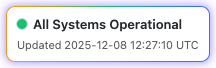
Full Widget

Compact Mode
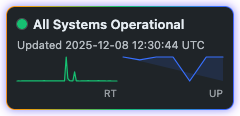
Dark Theme

Minimal Layout

With Incidents

SVG Badge
Get your status widget live on WordPress in under 5 minutes with our simple installation process.
Download directly from our download link.
Navigate to Plugins → Add New → Upload Plugin. Select the plugin ZIP file and activate it.
Go to Settings → StatusPage Widget to configure your default StatusPage URL and display preferences.
Open any page or post in the block editor. Click the + button and search for "StatusPage Widget" block.
Use the block settings panel to customize your widget. See live preview in the editor before publishing.
Click Publish when satisfied with your configuration. Your status widget is now live on your site.
Using the classic editor or widget areas?
Use this shortcode in posts, pages, sidebars or page builders to render the same status widget.
Complete control from your WordPress dashboard with intuitive settings and comprehensive documentation.
Configure your StatusPage URL, default theme, rendering mode, and refresh intervals in one place.
View live examples of the widget in different configurations. Perfect for understanding all available options.
Access comprehensive documentation, shortcode references, and troubleshooting guides right in your dashboard.
Learn about premium features and integration options available through StatusPage.me.
See why using the WordPress status widget plugin is better than pasting embed code by hand – save time, avoid mistakes, and keep your status page easy to manage.
| Feature | Plugin | Manual Embed |
|---|---|---|
| Easy Installation | ✓ | ✗ |
| No Coding Required | ✓ | ✗ |
| Visual Editor Integration | ✓ | ✗ |
| Live Preview | ✓ | ✗ |
| Dashboard Configuration | ✓ | ✗ |
| Automatic Updates | ✓ | ✓Only when you manually update embed code |
| Shortcode Support | ✓ | ✗ |
| Theme Customization | ✓ | ✓CSS tweaks required in multiple places |
A lightweight WordPress plugin that works with modern PHP versions and any StatusPage.me account.
Answers to common questions about the StatusPage.me WordPress widget plugin.
Get started in minutes with our free WordPress plugin. No setup fees, no limits, no complications.
Download Plugin NowAlready using StatusPage.me? You're just minutes away from embedding your status widget on WordPress.